Identity still matches
Compare eyes, mouth, face shape, pose, clothing, and age. A cleaner result is only useful if it still feels like the same person.
Upload an old family photo, repair damage, recover faded detail, colorize when needed, and compare the restored version before download.
The first screen stays simple: upload a photo or choose a sample. Settings only appear after you have a result to judge.
Use a JPG, PNG, or WEBP up to 10 MB. You can inspect the photo before signing in.
Run one watermarked browser preview before sign-in, then decide whether the photo is worth saving.
Sign in for 3 starter credits. Paid credits or Pro remove the watermark for keeper photos.
These sample photos show the intended restoration style: cleaner, clearer, and still faithful to the original photo.
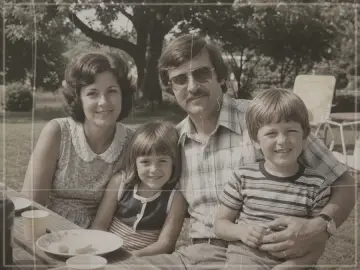
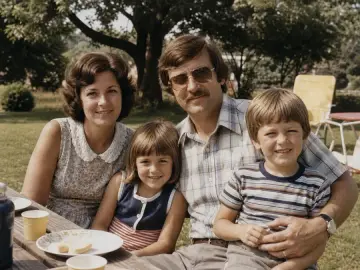
Recovers faded color, contrast, and face detail while keeping the original family snapshot believable.
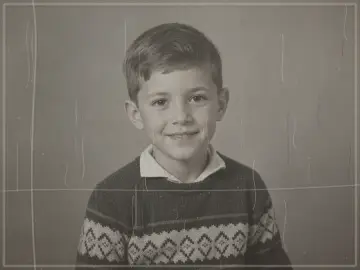

Reduces scratches, paper folds, and dust while preserving the child's expression and studio-photo feel.
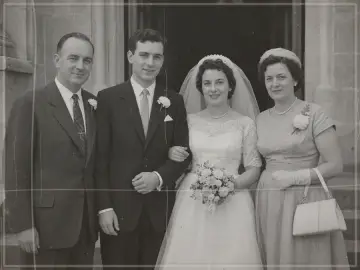
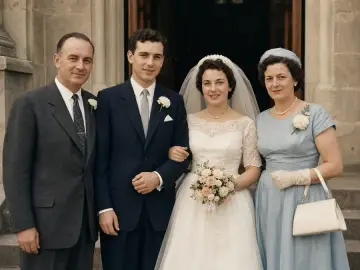
Adds restrained color and improves the scan while keeping wedding fabric and skin tones believable.
Scan one photo from an album, repair scratches, and create a cleaner copy for relatives without changing the memory.
Improve old portraits enough to recognize faces, uniforms, rooms, and handwritten archive context.
Restore gently when the goal is a frame, service program, or private family keepsake.
Make a cleaner version for a birthday, anniversary, reunion, or framed print after checking the free preview.
Compare eyes, mouth, face shape, pose, clothing, and age. A cleaner result is only useful if it still feels like the same person.
Look at scratches, folds, stains, paper texture, and background edges. Softening everything can look clean but lose important detail.
Uniforms, rooms, cars, furniture, and fabric should not look modernized. Keep the untouched scan for family records.
A preview that looks fine on a phone may not hold up as a large print. Use paid export only after checking the result at the size you need.
If a face or object is missing, treat the result as an interpretation. High-stakes archives still need a human retoucher or a better scan.
The important details are simple: one no-sign-in watermarked preview, 3 starter credits after sign-in, one photo per credit, and paid credits or Pro remove the watermark.
Yes. You can run one no-sign-in watermarked browser preview per device. Sign in to save results, continue restoring, and use 3 starter credits. Paid credits or Pro remove the watermark.
No. You can upload a photo or choose a sample first. Visitors can try one watermarked browser preview before sign-in. Sign-in is used for saved results, downloads, more credits, and paid exports.
JPG, PNG, and WEBP are supported up to 10 MB. HEIC is not promised in the first release because that format needs extra conversion checks across browsers and phones.
The tool is designed to preserve identity, pose, clothing, expression, and the original scene. Very damaged or tiny faces can still be uncertain, so use the before/after slider before relying on a result.
Yes. The Colorize page focuses on natural, period-aware color. It should not modernize clothes, backgrounds, or skin tones, but old prints with missing detail may still need a manual editor.
Uploads and results are kept only as long as needed for account history, support, and repeat downloads. You can request deletion from the account or support channel, and we process deletion requests within 30 days.
Explore related pages
Start with online restoration, try a free preview, or focus on damaged-photo repair.