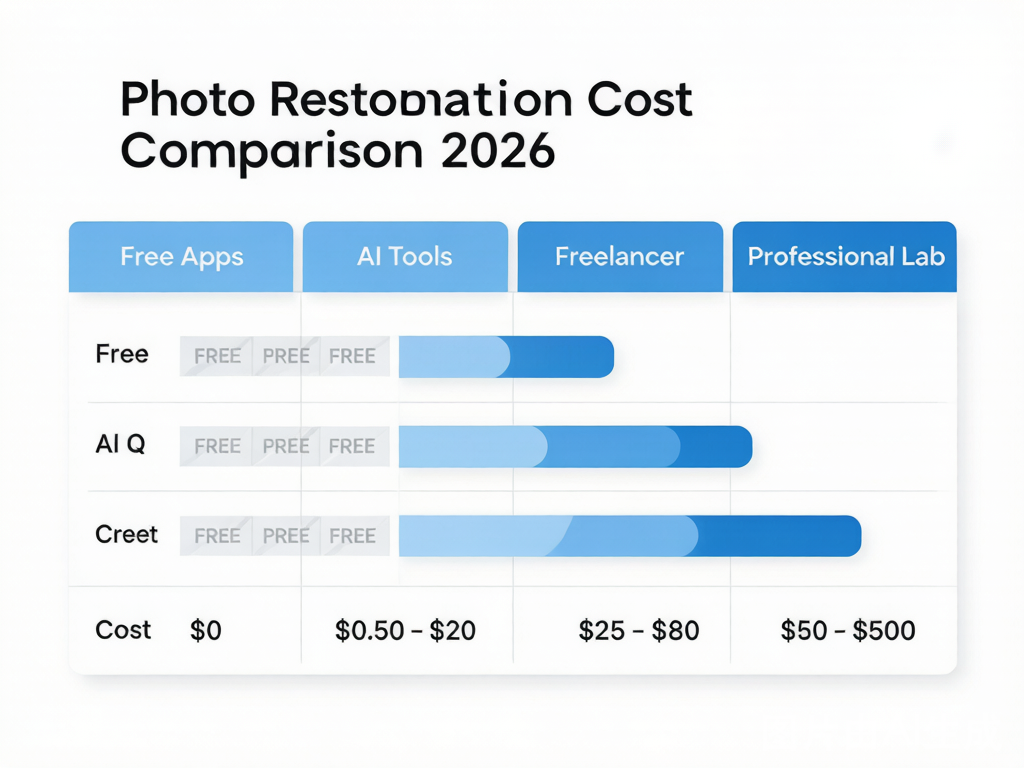
Professional photo restoration cost anywhere from $0 to over $500 per photo in 2026, depending entirely on who does the work and how badly your photo is damaged. A typical family archive of 50 photos runs $20–$40 with an AI subscription tool, $250–$750 at a retail photo shop, and $5,000–$30,000 through a professional restoration lab. That gap is real, and most people overpay because they don’t know which tier they actually need.
This guide breaks down exactly what you should pay — and what you shouldn’t — for every tier of photo restoration available right now.
What You Need to Know
Photo restoration pricing in 2026 spans three orders of magnitude. The market splits into four clear tiers — and the tier that’s right for your wedding portrait isn’t the same tier that’s right for your box of 200 vacation snapshots.
Before diving into dollar amounts, here’s what drives cost:
- Damage severity. Light scratches and fading cost far less to fix than water damage, mold, or missing facial features.
- Photo quantity. Batch pricing drops per-photo costs by 15%–30% across every tier.
- Turnaround time. AI delivers results in seconds to minutes. Professional labs take 1–6 weeks.
- Output quality needed. Social media sharing needs far less resolution than an 11×14 print for grandma’s wall.
Most people who overspend on photo restoration do so because they pick a tier too high for their actual needs. The reverse is also true — people who pick the cheapest option for an heirloom photograph end up with a result they regret.
Photo Restoration Pricing 2026: Quick Decision Rules
Use this photo restoration pricing 2026 checklist before you pay:
- If you need the lowest AI photo restoration price, start with a credit-based tool instead of a monthly plan. It keeps the cost tied to actual restored images.
- If you are comparing old photo restoration cost for a family archive, price the whole batch, not one sample image. A 50-photo project changes the math fast.
- If you need professional photo restoration pricing, ask for the all-in quote, including consultation, shipping, file delivery, and rush fees.
- If you want a restore old photos price comparison, compare the same damaged image across one AI tool, one freelancer, and one lab before committing the full archive.
Pricing Breakdown by Tier
Tier 1: Free Apps — $0 per Photo
Free photo restoration apps (Remini free tier, Hotpot, Photomyne) cost nothing upfront. The trade-offs are baked in:
- Watermarks on exported images
- Low-resolution output (not suitable for printing)
- Limited features — basic color correction only, no scratch removal
- 3–5 free restorations before a paywall appears
- Aggressive advertising
Free tiers work for testing whether restoration is even possible on a badly damaged photo. They’re also fine for sharing a quick touch-up on social media where nobody will zoom in. For anything destined for a photo album, frame, or family archive, free tiers fall short.
Tier 2: AI-Powered Tools — $0.50 to $20 per Photo
AI restoration tools are the fastest-growing tier and the best value for most family projects. Pricing splits into three models:
Pay-per-photo (coin/credit systems): Buy a pack of credits once, spend them per restoration. No subscription, no recurring charges. Typically $0.50–$2.25 per photo for basic restoration, up to $15–$20 for heavy restoration with colorization and face-specific repair.
Subscription apps: $6–$60/month. These make sense if you restore 50+ photos every month consistently. If you subscribe, restore 30 photos over a weekend, then forget to cancel, you’re effectively paying $2–$4 per photo — 3x to 8x the coin-based price.
One-time purchase desktop software: Topaz Photo AI ($199 one-time), Affinity Photo ($69.99 one-time). Requires moderate skill. Worth it for photographers who already edit images, overkill for a one-time family archive project.
Real per-photo costs from testing (100-photo project, mix of light to moderate damage):
| Platform | Per-photo cost | 100-photo total | Quality (1–10) |
|---|---|---|---|
| Subscription AI (e.g. PhotoFlip) | $0.20–$0.40 | $20–$40 | 9 |
| Credit-based AI (e.g. Restory) | $0.50–$2.25 | $50–$225 | 9 |
| Retail photo shop (basic) | $25–$75 | $2,500–$7,500 | 7–8 |
| Professional lab (moderate) | $100–$200 | $10,000–$20,000 | 9–10 |
For most family photo collections, AI tools deliver 90%–95% of the quality of professional work at 1%–3% of the price.
Try AI-powered restoration for free at oldphotorestoration.app
Tier 3: Freelance Artists — $15 to $80 per Photo
Freelance photo restorers on platforms like Fiverr and Upwork charge $15–$80 per photo, with turnaround times of 2–7 days. This tier sits between AI tools and professional labs.
What you get: A human making judgment calls on each photo. Better than AI for photos with unusual damage patterns, non-Western faces (which AI models sometimes struggle with), and cases where you want specific creative decisions — keep the original sepia tone versus full colorization, for example.
What to watch for: Freelancers vary wildly in skill. Always ask for a single-photo sample before committing to a batch. A $25/photo freelancer who returns work indistinguishable from AI output isn’t worth the premium over a coin-based AI tool. A $50/photo freelancer who hand-reconstructs missing face details that AI can’t handle? That’s money well spent.
Tier 4: Professional Restoration Labs — $50 to $500+ per Photo
This is the premium tier: restoration artists who work on museum archives, historical society collections, and heirloom family portraits.
Pricing by damage level:
- Basic restoration (small scratches, mild fading): $50–$100 per photo
- Moderate restoration (tears, water stains, missing edges): $100–$200 per photo
- Heavy restoration (major damage, missing sections, face reconstruction): $200–$500 per photo
- Museum/archival restoration: $500–$1,500+ per photo
Professional labs add hidden costs that first-time customers miss: consultation fees ($25–$100), shipping and insurance ($15–$30 each way), rush processing surcharges ($50–$150+), and high-resolution file delivery fees.
Turnaround is 2–6 weeks. For one irreplaceable photograph — the only image of a great-grandparent, a wedding portrait that’s 80% ruined — this tier is worth every dollar. For a box of 100 family snapshots, it’s financially punishing.
Cost Comparison Table
Here is the full pricing breakdown across every restoration tier, based on combined data from BringBack.pro, Restory, and PhotoFlip’s 2026 testing:
| Tier | Per Photo | 50 Photos | Turnaround | Quality | Best For |
|---|---|---|---|---|---|
| Free Apps | $0 | $0 | Seconds–minutes | Low (watermarked) | Testing, social media |
| AI Tool — Coin/Credit | $0.50–$2.25 | $25–$112 | Seconds–minutes | High | Family archives, 10–500 photos |
| AI Tool — Subscription | $0.20–$2.00 | $10–$100 | Seconds–minutes | High | Consistent monthly users |
| Freelancer (Fiverr/Upwork) | $15–$80 | $750–$4,000 | 2–7 days | Variable (6–9) | Unusual damage, specific creative requests |
| Retail Photo Shop | $25–$75 | $1,250–$3,750 | 1–2 weeks | Medium–High | Small projects, local convenience |
| Professional Lab — Basic | $50–$100 | $2,500–$5,000 | 2–6 weeks | Very high | Heirloom photos, historical value |
| Professional Lab — Heavy | $200–$500+ | $10,000–$25,000+ | 4–8 weeks | Museum-grade | Archival reproduction, severely damaged portraits |
| DIY Desktop Software | $70–$199 one-time | $70–$199 total | Hours–days of your time | Skill-dependent | Photographers, editors |
Common Mistakes
Mistake 1: Paying a professional lab for family snapshots. Labs charge $50–$100 per photo for basic restoration. A box of 30 family photos runs $1,500–$3,000. An AI restoration tool handles the same box for $30–$60 with near-identical results. Reserve pro labs for the 1–3 photos in your archive with genuine historical or sentimental importance.
Mistake 2: Subscribing to an AI app for a one-weekend project. Most people restore their old photos in concentrated bursts — finding the shoebox in the attic, spending a weekend scanning and fixing everything, then not touching restoration again for a year. A monthly subscription at $40–$60 loses you money by month two. Coin-based tools with no expiry match this usage pattern far better.
Mistake 3: Ignoring hidden costs in professional quotes. Lab quotes for “$75 per photo” often exclude consultation fees, round-trip shipping with insurance, and file delivery charges. The real all-in cost for one photo runs 30%–50% higher than the sticker price. Always ask for a total estimate before shipping originals.
Mistake 4: Using free apps for heirloom-quality photos. Free app output is low-resolution, watermarked, and often suffers from aggressive compression. If you’re restoring the only photograph of a great-grandparent, spend at least the $2–$5 for a high-resolution AI restoration. The dollar saved isn’t worth the permanent quality loss.
Mistake 5: Not combining AI with manual touch-up. Running a photo through two AI tools sequentially — one for overall restoration and scratch removal, another for face-specific detail — produces meaningfully better results than either tool alone. The extra $0.50–$1.00 per photo is the highest-leverage spend in the entire restoration workflow.
Expert Tips
Match the service tier to the photo’s value, not the photo count
A wedding portrait from 1942 that’s the only image of your grandmother deserves a professional lab or a top-tier freelancer. The 200 vacation photos from 1987 that you’d like to digitize? AI tools will handle those beautifully at pennies per photo.
Test before committing to any paid tier
Send one moderately damaged photo to two services simultaneously — an AI tool and a professional lab or freelancer. Compare results side by side. If the AI output looks 95% as good, scale the AI tool across your full project. If the lab output is visibly better on details that matter to you, pay up for the photos that count.
Watch for the “lifetime deal” trap
“$99 one-time for lifetime access” offers from small AI restoration startups carry real risk — the company may not exist in two years. If your family archive matters long-term, prefer established vendors with sustainable pricing models, even if slightly more expensive per batch.
Prioritize identity preservation over enhancement
A restoration that makes faces look “better” but different from the real people is worse than no restoration at all. When evaluating any tool or service, zoom into faces first. Do eyes, nose shapes, and jawlines match the original? Good AI tools preserve identity faithfully; bad ones smooth faces into generic templates. This is the single most important quality test, and it’s the one where oldphotorestoration.app consistently performs well.
Scan once, restore many times
Invest in a proper scan at 600 DPI before sending any original to a service. A high-quality scan means you can try multiple restoration approaches on copies of the same file — AI first, then manual touch-ups on the AI output, then maybe a freelancer for the trickiest 10% of photos. The scan costs you nothing (a smartphone in good light works for most family photos) and preserves your options forever.
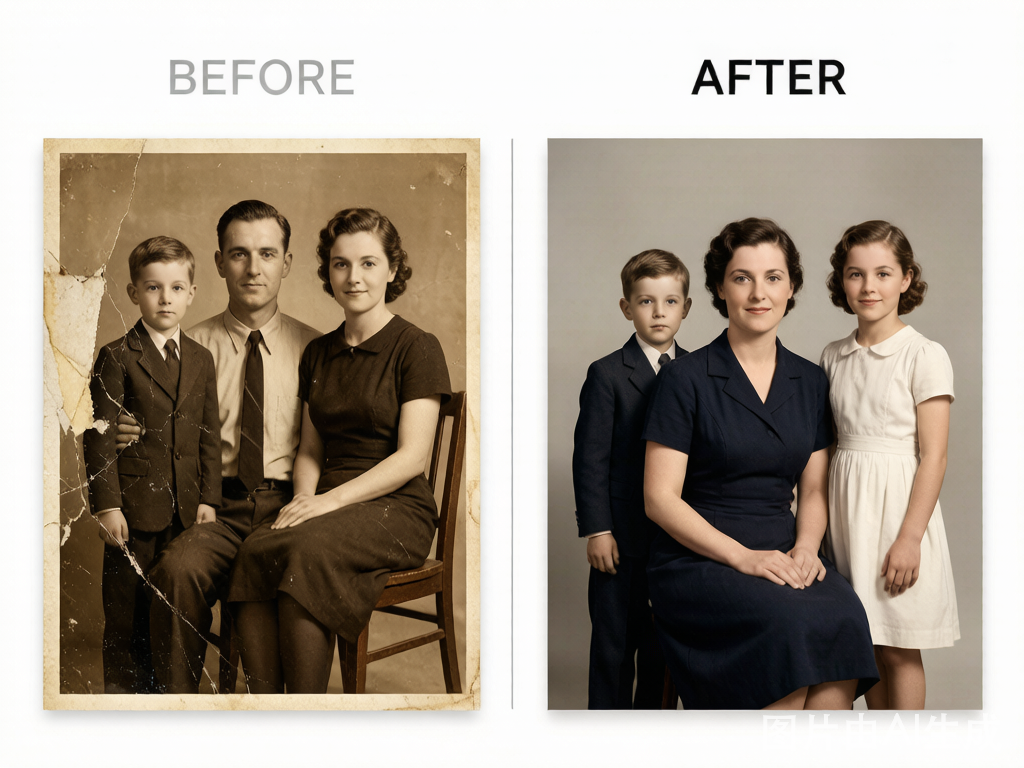
YouTube Deep-Dive: AI vs Professional Restoration
This video from professional photo restorer Antony Vintage shows a hands-on comparison between AI one-click restoration and manual professional techniques — and explains where each approach wins and loses:
FAQ
Is AI photo restoration as good as a professional?
For 90% of typical family photos with light to moderate damage — scratches, fading, minor tears — modern AI restoration is indistinguishable from professional work. Where professionals pull ahead: photos with missing sections, heavy water damage where the photo emulsion has lifted, non-Western faces that AI models handle inconsistently, and images where you need specific creative decisions about color grading or mood. For those edge cases, a professional earns their fee.
How much does it cost to restore 50 old family photos?
With a coin-based AI tool: $25–$60. With a monthly AI subscription used strategically: $30–$50. With a retail photo shop: $1,250–$3,750. With a professional lab: $2,500–$10,000+. The most common real-world path for families in 2026 is AI restoration with 1–3 heirloom photos sent to a professional — total project cost under $200 for 50 photos, with near-perfect results on the ones that matter most.
What’s the cheapest photo restoration that actually works?
Coin-based AI tools at $0.50–$2.25 per photo deliver professional-grade output for family photo projects. Free apps technically “work” but with watermarks and low resolution that make prints impossible. Avoid any “cheap” professional service under $15/photo — at that price, you’re likely getting automated AI output resold at a markup, not human retouching work.
How long does photo restoration take?
AI tools: seconds to minutes per photo, 1–3 hours for a 100-photo batch. Freelancers: 2–7 days for a small batch. Professional labs: 2–6 weeks, with rush options adding 25%–50% to the base price.
Can you restore a photo that’s been torn in half?
Yes, if the tear is clean and both halves survive, AI tools can rejoin them with convincing results. If sections are missing entirely — especially facial features — a professional lab with reference photos of the same person will outperform AI. The American Institute for Conservation maintains a directory of qualified photograph conservators for these difficult cases.
What resolution should I scan old photos for restoration?
600 DPI minimum for prints and negatives. At 300 DPI, subtle damage patterns that AI tools can fix are lost in the scan itself. A smartphone photo of the original works for testing (better lighting than you think), but a proper flatbed scanner at 600 DPI produces noticeably better restoration results because the AI has more pixel data to work with.
Do photo restoration apps keep my photos?
Some do — specifically free apps that monetize by training AI models on user uploads. Always check the privacy policy for language about training data, third-party sharing, and data retention. Paid AI restoration tools and professional labs generally offer stronger privacy guarantees. If a photo is irreplaceable, don’t upload it to an app whose privacy policy you haven’t read.
Is it worth restoring old photographs?
For the photos you actually care about — the ones you’d show your kids, the ones you’d print and frame — yes. AI restoration has made the cost equation decisive: $20–$40 restores an entire family archive where two years ago the same project would have cost hundreds or thousands of dollars. The photos that are truly beyond saving are rare. Most faded, scratched, and yellowing prints that look hopeless by eye produce remarkable results when processed through modern AI restoration models.
Explore more: oldphotorestoration.app — Pricing — Blog
Sources: PhotoFlip AI 2026 pricing analysis, Restory 2026 cost comparison study, BringBack.pro professional pricing survey, American Institute for Conservation Photographic Materials Group.